
Loop Audio
Loop any part of a song, lecture or recording. Load an audio file, set the loop start and end with the sliders or the “Set A” and “Set B” buttons while it plays, and the section repeats seamlessly. Slow it down for practice, then export the loop repeated as many times as you like as a WAV file. Your audio never leaves your device.
- Free to use
- No sign-up
- Runs in your browser

Audio looper
Choose an audio file to begin. The waveform shows the loop region in colour.
Practice Loop & Repertoire Tracker
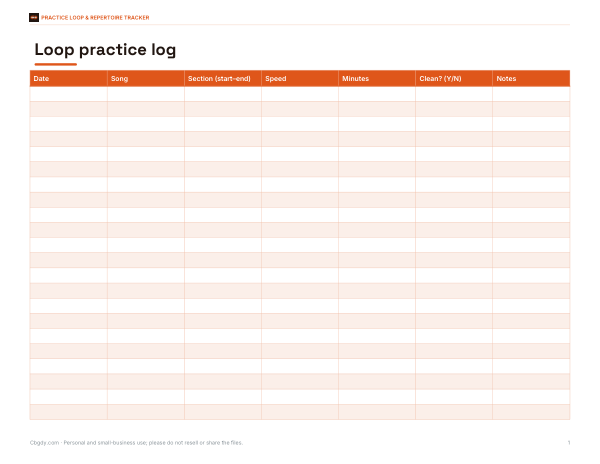
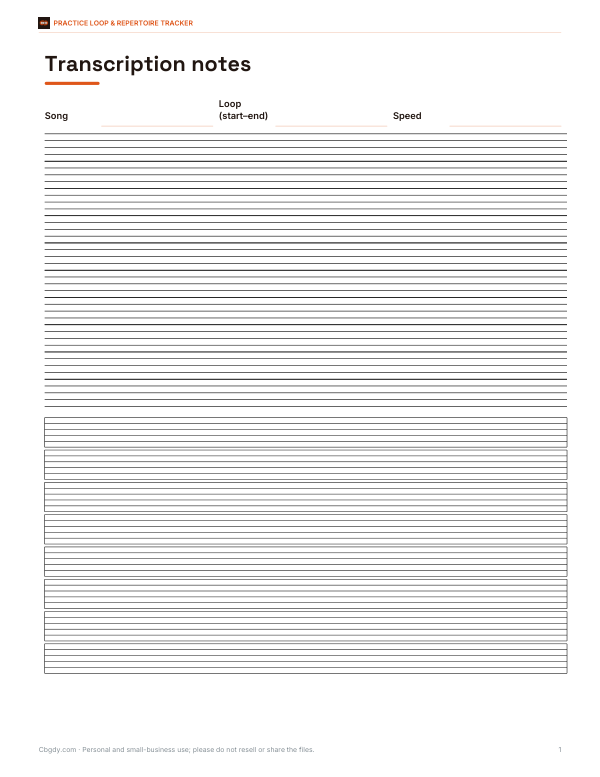
Printable loop practice log, a repertoire tracker workbook, a transcription notes sheet with staff and tab, and a practice session planner.
- Loop practice log (PDF, XLSX)
- Repertoire tracker (XLSX)
- Transcription notes (PDF)
- Session planner (PDF, DOCX, XLSX)
Formats: PDF, XLSX, DOCX. Instant download after payment (link valid 72 hours, up to 5 downloads). AI-assisted: the templates were drafted with AI help and reviewed and laid out before publishing.
$3.00 USD, one-time 4 files · about $0.75 each
- Instant download
- 7-day refund
- Secure checkout by Stripe
✓ Classroom use included
7-day money-back guarantee. Full refund within 7 days of purchase, even after you download.
Free sample: Loop Practice Log (PDF, 53 KB)
Full refund within 7 days — see the refund policy and license.
License: personal and classroom use. Teachers may print and photocopy these files for the students in their own classes, and share them in a password-protected class space (e.g. Google Classroom). Please do not resell, redistribute, or post the files on public websites. One purchase covers one teacher.
Free printables
Single sheets you can print right now, no sign-up. The full pack adds every sheet in one download plus the editable files.
 Printable Practice Session Planner
How to loop part of a song
- Load an audio file from your device — MP3, WAV, M4A or OGG.
- Drag the loop start and end sliders, or play the track and press “Set A” at the start of the section and “Set B” at the end.
- Press “Play loop”. The section repeats seamlessly until you press Stop, and the yellow playhead shows the position.
- Adjust the loop while it plays — changes take effect immediately.
- Slow the playback down if needed (pitch changes with speed in the looper).
- Export the section repeated several times as a WAV file to practise with anywhere.
The loop uses your browser’s Web Audio engine, which repeats the exact samples between the two points, so there is no gap when it jumps back to the start.
Why musicians loop sections
Repetition is how difficult passages become easy. Looping a two-bar lick, a chord change or a drum fill lets you hear it dozens of times in a row and play along without stopping to rewind. Many teachers recommend looping a short section slowly until it is clean, then gradually raising the speed, then widening the loop to include what comes before and after so the passage connects to the rest of the piece. Transcribers use loops to work out exact notes, and singers use them to learn harmonies and phrasing.
Finding clean loop points
- Set loop points on the beat — at the start of a bar — so the loop keeps time.
- Zoom in by making the loop shorter and adjusting in small steps; the value shows two decimal places.
- Listen for a click at the loop point; moving the end a few hundredths of a second usually removes it.
- For practice loops, include a beat or two before the tricky part so you can get into it.
- For exported loops, the tool adds a very short crossfade at each join to reduce clicks.
Uses beyond music
| Use | How looping helps |
|---|---|
| Language learning | Repeat a sentence until you can hear every sound and shadow the speaker |
| Transcription | Loop a hard-to-hear phrase in an interview or lecture |
| Dance practice | Loop the section of choreography you are learning |
| Podcast and video editing | Check a section for noise or timing |
| Sound design | Test whether a rhythm or ambience loops smoothly before using it |
| Meditation or sleep sounds | Extend a short ambient recording by repeating it |
Worked example
A bass player is learning a fast fill that starts at 1:42 in a song. They load the MP3, play from start, press “Set A” just before the fill and “Set B” at the downbeat after it, giving a loop from 101.80 to 104.60 seconds. At 0.75× speed they play along for ten minutes, then return to 1.0×. Finally they export the 2.8-second loop repeated 20 times — a 56-second WAV — to practise on their phone during the week.
Practice routine with loops
- Find the hardest two to four bars and set a loop around them.
- Listen five times without playing, humming or tapping along.
- Slow the loop until you can play it cleanly, even if that is 60% speed.
- Play along ten times clean before speeding up by 5–10%.
- Widen the loop by a bar on each side so the passage connects to the music around it.
- Finish by playing along with the full song at normal speed.
Ten focused minutes on a loop usually achieve more than playing the whole song repeatedly, because every repetition targets the part that needs work.
Exported files
The export repeats the selected section the number of times you choose and saves an uncompressed WAV at the original speed and pitch. WAV files are large — about 10 MB per minute of stereo audio — so keep repeat counts sensible for long sections. You can convert the WAV to MP3 in most audio apps if you need a smaller file.
Copyright
Looping recordings for personal practice and study is a normal use of music you own or have access to. Sharing or publishing loops made from commercial recordings — for example as samples in your own tracks — generally needs permission from the rights holders.
Privacy
Audio files are decoded and played entirely in your browser. Nothing is uploaded or stored.
Frequently asked questions
How do I loop part of a song?
Load the file, set the loop start and end, and press Play loop.
Is the loop seamless?
Yes, playback repeats the exact audio between the points without a gap.
Can I slow the loop down?
Yes, from 0.5× to 1.5×; in this looper the pitch changes with speed.
Can I save the loop?
Export it as a WAV file repeated as many times as you choose (up to 50).
What formats work?
Most formats your browser can play, including MP3, WAV, M4A and OGG.
Is my audio uploaded?
No, everything stays on your device.
Why does the loop click at the join?
The waveform does not line up at the loop points; nudge the start or end by a few hundredths of a second.
How long can a loop be?
Any length within the file; exports are limited to keep files under about 400 MB.
Does the export include the slower speed?
No, exports are at the original speed and pitch.
May I print and share these worksheets with my class?
License: personal and classroom use. Teachers may print and photocopy these files for the students in their own classes, and share them in a password-protected class space (e.g. Google Classroom). Please do not resell, redistribute, or post the files on public websites. One purchase covers one teacher.